For founders and client-facing team leaders
Back-to-back meetings.People counting on you.
Meet Greg, your AI executive assistant. He captures what you agree in meetings and helps you follow through, even when your day takes you away from your desk.
- Connect your calendar
- Greg joins your next call
- Get your brief and actions
Free to start. No credit card needed. Set up in 2 minutes.


Active assistant
Greg is capturing actions
Skip the meeting.Not the details.
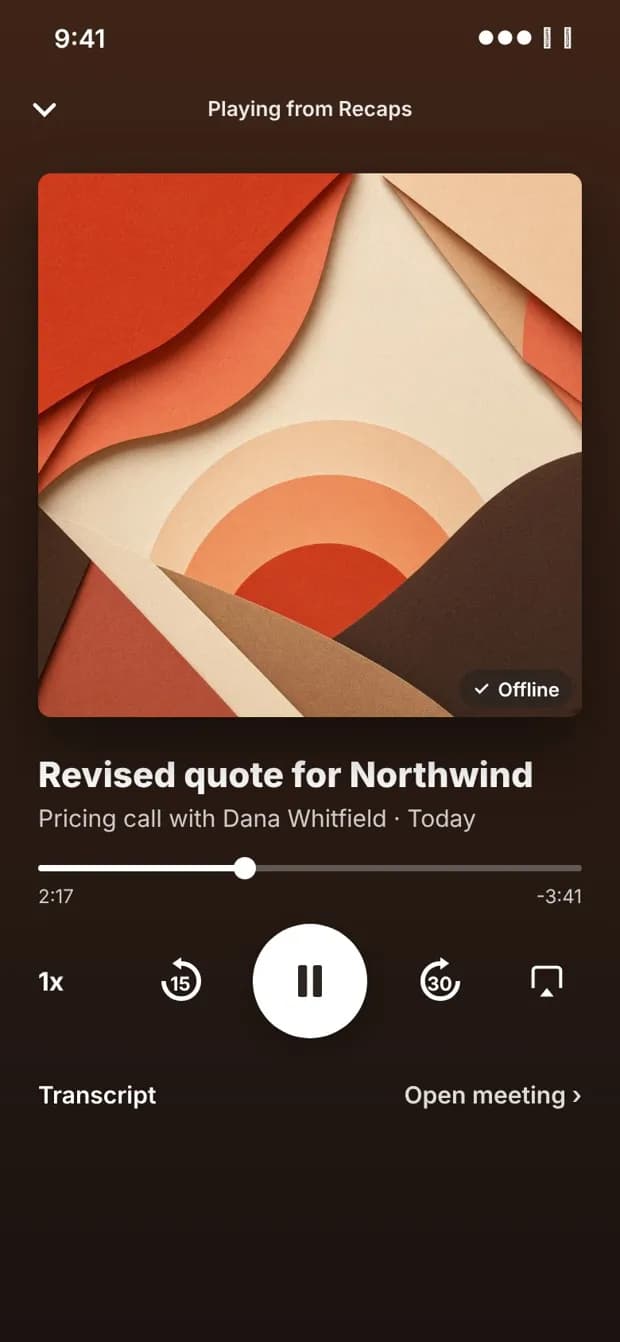
You don't need to sit in every meeting to know what your team decided. Greg turns each one into a recap you can play like a podcast., wherever your day takes you.
 School run
 Run
Run Walk
WalkNo chasing summaries.
A recap lands on your phone after each meeting. You never have to go looking.
Short enough for the school run.
Meeting recaps run under 6 minutes, weekly recaps under 8.
Ask Greg follow-ups by voice.
Who said what, what was decided and what happens next.
- Podcast-style recaps
- Voice Briefs and Debriefs
- Works with CarPlay
- Ask who said what
The iPhone app is in beta on TestFlight. Ask for access when you sign up.
Joins the calls you pick
Zoom, Google Meet and Teams, or in person from your phone.
Turns talk into actions
Every agreed action, with an owner and a date.
Preps your next meeting
A short brief before each call, so you walk in ready.
Try Greg on your next meeting
Connect your calendar and Greg handles the rest.
Be in the conversation.Greg has the notes.
Invite Greg to your meeting and give the conversation your attention. Afterwards, find the decisions, the actions and the next steps without replaying the whole call.
- What was decided.
- Who agreed to do what.
- What needs a follow-up.
Client launch review
DemoDecision
Move the launch to Monday.
Next step
Maya sends the revised plan on Thursday.
Still open
Who is approving the final budget?
“Greg, what did we commit to last time?”
Ask while you're in the meeting. Greg brings the relevant context back into the conversation, so you can make the next decision with the last one in mind.
“What changed since our last call?”
“What do we still need to decide?”
“Make a note that I'll send the revised plan on Thursday.”
Your next meeting starts before you get there.
Get a spoken brief on the way: who you're meeting, where you left things and what needs your attention.
In the taxi. Through your headphones. Before you board. Greg helps you arrive with the important details fresh in your mind.
Example briefDemo
“You're meeting Maya at two. The launch has moved to Monday. The revised plan is due Thursday, and budget approval is still open.”

Greg can call you. You can call Greg.
Set up a call to prepare for the day or talk through it afterwards. Call Greg when you need a quick answer or want to talk through what comes next.
Incoming
Greg
Prepare for the day
Calling
Greg
Talk through what comes next
“Catch me up before my next meeting.”
“What did I say I'd get done today?”
“Talk me through what needs my attention tomorrow.”
A conversation that fits between the other conversations.

A voice note for the walk. A message for the team.
Listen to your debrief through your headphones. Leave Greg a voice note when a thought comes to you. Get the decisions and follow-ups in Slack, ready to pick up where the conversation left off.
Greg
Example Slack message · Demo
Launch review: Monday is the new launch date. Maya is sending the revised plan on Thursday. Budget approval still needs an owner.
Choose how you want to hear from Greg as you set him up.
One person's follow-up is someone else's starting point.
A commitment to a client becomes a deadline for delivery. A changed decision affects the next meeting. The work carries on across people, conversations and days.
Bring your team into Greg so the context can carry on with it.
Keep the agreement attached to the work.
Understand what was promised and why, with the conversation there when someone needs the detail.
Make the handover easier.
Give the next person the decision, the context and the next step, without asking them to sit through another meeting.
Know what still needs attention.
Bring outstanding commitments and unresolved questions into view before the next conversation.
Start with your meetings. Invite teammates as the work connects.
Same launch example
DemoMaya has the next step.
Decision: move the launch to Monday. Next step: send the revised plan on Thursday. Still open: who is approving the final budget?
Give your team's intentions somewhere to go.
“I'll send it.”
“Let's move it to Monday.”
“We need approval first.”
That's how work gets agreed. Greg connects those conversations to the people, decisions and next steps behind them.
We call it an intent engine: a shared understanding of what your team is trying to get done, built from the conversations where the work begins.
Keep talking. Keep the work moving.
Start where you are.
Assistant
$24/ month
One busy person with a work inbox, a personal inbox and too many meetings.
Get AssistantChief of Staff
$49/ month
Founders and operators who run the day from Slack, their phone and their CRM.
Get Chief of StaffTeams
$39/ seat / mo
Teams who'd like to know what was agreed in the meeting they skipped. From $117/mo for 3 seats ($93/mo billed annually).
Get TeamsEnterprise: security review, custom retention and volume pricing. Talk to us
Bring Greg to one meeting. See what you get back.
Choose an upcoming meeting.
Invite Greg to take the notes.
Review the decisions and next steps afterwards.
Then add the briefs, calls and team conversations that are useful to you.
Begin with the meeting already in your calendar.
Frequently Asked Questions
Do I need to bring my whole team?
Start with your own meetings. Add teammates when you're ready to share the work and its context.
Is Greg just for notes?
No. Meeting notes give Greg the context to help with preparation, questions and follow-through during the rest of your day.
Can I talk to Greg?
Yes. You can call Greg, ask questions during a meeting and send voice notes when those features are available in your plan. Greg can also call you with a brief or debrief when you've set that up.
Where can I get my updates?
Use calls, voice notes or Slack as part of your setup. Choose the ways that fit how you work.
What does it cost?
There is a free plan with 20 credits a month. Paid plans are Assistant at $24/mo, Chief of Staff at $49/mo and Teams at $39/seat/mo (or $19/mo, $39/mo and $31/seat/mo billed annually). Enterprise: contact sales. See the pricing page for every limit. View pricing
You've already got another meeting.Bring Greg.
Get the notes. Keep the context. Have some help with what comes next.